Flask로 페이지 링크 및 파라미터 전송
- templates 이름의 폴더 생성하여 밑에 view파일 생성
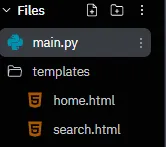
-
함수에서 View를 리턴시키기 위해서는 render_template를 import 해야 함.
-
URL매핑 시 Parameter를 받기 위해서는 request를 import 해야 함.
-
HTML 페이지 리턴 return render_template(‘home.html’)
-
Parameter추출 keyword = request.args.get(‘keyword’)
-
HTML페이지 리턴 시 값을 같이 넘겨줌 return render_template(‘search.html’, keyword=keyword)
-
HTML에서 {{keyword}} 를 이용하여 받은 값 출력

Code >
Python
from flask import Flask, render_template, request

app = Flask("HelloFlask")

@app.route("/")
def home():
    return render_template('home.html')

@app.route("/search")
def search():
    print(request.args)
    print(request.args.get('keyword'))

    keyword = request.args.get('keyword')

    return render_template('search.html', keyword=keyword)

app.run("0.0.0.0")
HTML
<!DOCTYPE html>
<html lang="en">
<head>
<meta charset="UTF-8">
<meta http-equiv="X-UA-Compatible" content="IE=edge">
<meta name="viewport" content="width=device-width, initial-scale=1.0">
<title>search</title>
</head>
<body>
<h1>Search~! {{keyword}}</h1>
{% for job in jobs %}
<tr>
<td>{{job.title}}</td>
<td>{{job.company}}</td>
<td>{{job.location}}</td>
<td><a href="{{job.link}}" target="_blank">Apply →</a></td>
</tr>
{% endfor %}
</body>
</html>위
search()뷰와는 별개로,jobs라는 리스트 파라미터를 넘겨받았다고 가정했을 때 Flask(Jinja2) 문법의 for문으로 반복 출력하는 예시.
# jobs를 넘겨주는 뷰가 있다면 이런 형태가 된다
@app.route("/jobs")
def job_list():
    jobs = [
        {"title": "백엔드 개발자", "company": "A사", "location": "서울", "link": "#"},
    ]
    return render_template('jobs.html', jobs=jobs)
{% for job in jobs %}
<tr>
<td>{{job.title}}</td>
<td>{{job.company}}</td>
<td>{{job.location}}</td>
<td><a href="{{job.link}}" target="_blank">Apply →</a></td>
</tr>
{% endfor %}