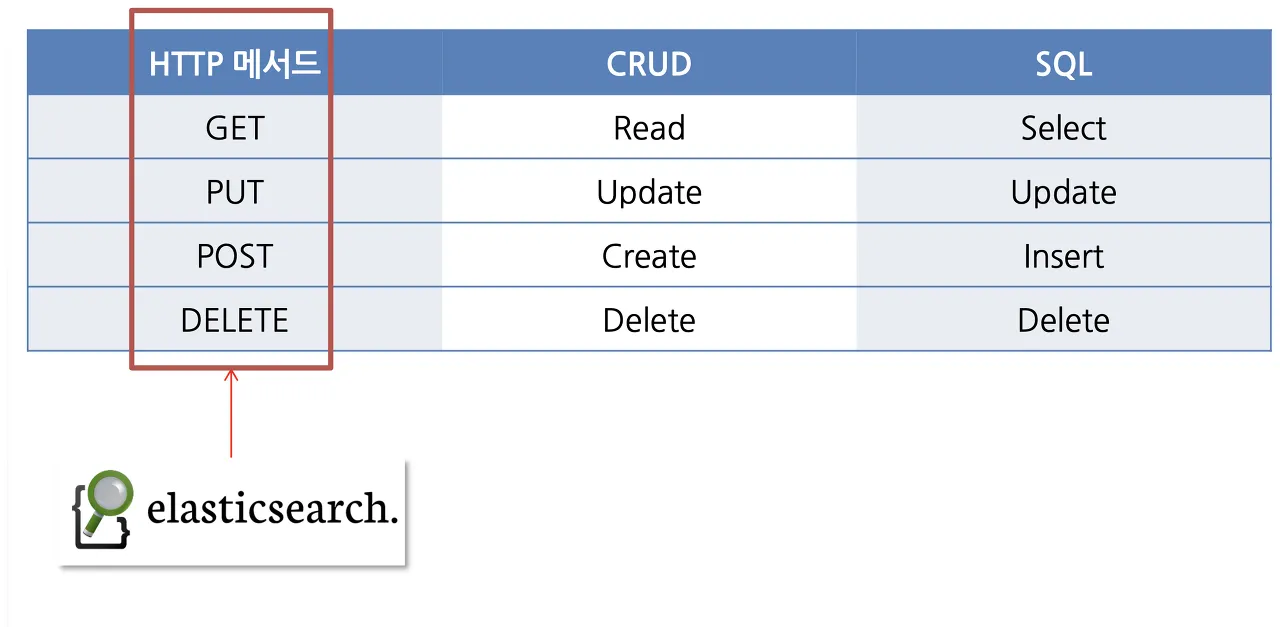
Elasticsearch는 http 프로토콜로 접근이 가능한 REST API(CRUD)를 지원한다.
설치 및 실행
홈페이지를 통해 다운로드 및 메뉴얼을 확인할 수 있다.
자세한 설치 방법은 https://triest.tistory.com/46 해당 블로그를 참조하면 된다.
REST API 구조
Elasticsearch REST API의 기본 구조.
Host:
- 클러스터의 호스트 주소
Port:
- 클러스터의 포트 번호 (Default: 9200)
Index:
- 데이터베이스 내에서 Document들을 묶어 관리하는 단위
Type:
- 인덱스 내 문서의 종류를 나타냄. ver 6.0 이상 부터는 _doc 등의 고정된 타입만 사용
Document ID:
- 문서의 고유 식별자 id
http://<호스트>:<포트>/<인덱스>/<타입>/<문서 ID>CRUD 요청
GET: 데이터 조회 POST: 문서 색인 및 검색 PUT: 문서 업데이트 DELETE: 문서 삭제 HEAD: 리소스 존재 여부 확인 PATCH: 부분 업데이트
HttpClient를 사용하여 요청
Spring에서 Elasticsearch와 HTTP 요청을 통해 상호작용 하기 위해선 RestTemplate, HttpClient를 사용할 수 있다.
<!-- 의존성 추가 -->
<dependency>
    <groupId>org.apache.httpcomponents</groupId>
    <artifactId>httpclient</artifactId>
    <version>4.5.13</version>
</dependency>
Create
private final CloseableHttpClient httpClient = HttpClients.createDefault();

public void createDocument(String index, String id, String jsonBody) throws IOException {
        String url = "http://localhost:9200/" + index + "/_doc/" + id;
        HttpPost request = new HttpPost(url);
        StringEntity entity = new StringEntity(jsonBody);
        request.setEntity(entity);

        try (CloseableHttpResponse response = httpClient.execute(request)) {
            HttpEntity responseEntity = response.getEntity();
            String responseBody = EntityUtils.toString(responseEntity);
            EntityUtils.consume(responseEntity);
        }
    }
Read
public String getDocument(String index, String id) throws IOException {
        String url = "http://localhost:9200/" + index + "/_doc/" + id;
        HttpGet request = new HttpGet(url);

        try (CloseableHttpResponse response = httpClient.execute(request)) {
            HttpEntity entity = response.getEntity();
            return EntityUtils.toString(entity);
        }
    }
Update
public void updateDocument(String index, String id, String jsonBody) throws IOException {
        String url = "http://localhost:9200/" + index + "/_update/" + id;
        HttpPost request = new HttpPost(url);
        StringEntity entity = new StringEntity(jsonBody);
        request.setEntity(entity);

        try (CloseableHttpResponse response = httpClient.execute(request)) {
            HttpEntity responseEntity = response.getEntity();
            String responseBody = EntityUtils.toString(responseEntity);
            EntityUtils.consume(responseEntity);
        }
    }
Delete
public void deleteDocument(String index, String id) throws IOException {
        String url = "http://localhost:9200/" + index + "/_doc/" + id;
        HttpDelete request = new HttpDelete(url);

        try (CloseableHttpResponse response = httpClient.execute(request)) {
            HttpEntity responseEntity = response.getEntity();
            String responseBody = EntityUtils.toString(responseEntity);
            EntityUtils.consume(responseEntity);
        }
    }
Spring Data Elasticsearch를 사용하면 JPA와 같은 형태로 사용할 수 있다.
reference.
https://velog.io/@baik9261/Elastic-Search-2-ES-CRUD-Search-API